
Alongside the release of EaselJS v0.3 we’re also releasing the first version of Zoë, a free Adobe AIR application for exporting SWF animations as sprite sheets (single images containing a grid of animation cells), including frame data for use with EaselJS.
This means you can use Flash Pro to lay out your animations then very easily prep them for use with EaselJS and the HTML5 canvas element.
We used an early version of Zoë to prep all of the animations for the Pirates Love Daisies game we released a few weeks ago, which let our illustration team work with a tool they felt comfortable with, using tweens, skeleton constraints, and graphic symbols.
Here’s a quick feature overview:
- Exports a single sprite sheet image, or individual frames
- Reads frame labels in the swf to generate frame data.
- Writes frame data as JSON or EaselJS files
- Calculates the frame dimensions automatically based on the animation content
- Saves profiles to make it easy to re-export when art changes
And a screenshot:
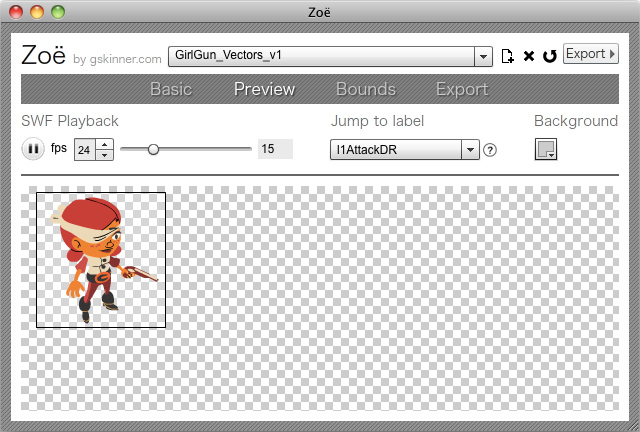
You can grab Zoë from easeljs.com/zoe.html. It’s currently not open source, but we’ll likely release the source once we have a chance to fix any major issues that arise with the public release and clean up the code.

So… when are you gonna release your own HTML5 IDE? j/k, but this is awesome stuff and a great help to the community to bridge the divide. Keep it up Grant!
Clicking ‘Export->’ doesn’t seem to do anything.
jomifo – this has been fixed in the latest build. It was a combination of a problem with the sample file and the app. Sorry for these teething problems. That’s the risk we ran releasing an app that had been used internally in a specific way without adequate testing.
Grant- latest build worked beautifully. Thanks for this tool. Great timesaver.
man, this is a great contribution to the community.
thanks a lot!
Hi, Grant.
Inspiring work.
I found some minor bug regarding special chars. When clicked export, on the summary window, my directory special chars are being truncated. Also, on the output and input fields, the chars are being converted to HTML entities.
Thanks, G.
CaioToOn!
Cool, that is. My only concern is that if each frame is exported as a separate bitmap, it would lead to rather a lot of Kb to download for an Easel animation. I guess if you use a separate BitmapSequence for each character in your game or animation that would help a bit, as long as the animations were not that complex.
Would it be possible to export the individual symbols in the Flash animation as separate bitmaps which then get composited & animated dynamically in EaselJS? Then the JSON format would need to specify the positions of these sprites at each frame.
Will this work with actionscript(instead of timeline based) animations?
@Shaun – In theory Zoe should work with Actionscript animations, but currently it uses the root timeline to gauge the length of the animation, so your main timeline would need to match the length you want to export.
@ bigfish “My only concern is that if each frame is exported as a separate bitmap”
I’m not sure if EaselJS supports sprite sheets, but most of the time game designers use TexturePacker or Zwoptex to create a sprite sheet from the individual bitmaps. This is how it works for iOS games I’m developping using Cocos2D.
I did an application with more features than this and more user frendly. Supports actionscript animations and empty main timelines.
Maybe you can use the code of my application to improve this one
Download installer or source code from here:
http://fermmm.wordpress.com/2011/02/04/swf-spritesheet-creator/
i can’t set the quality of png.
Do you know if it’s possible to dynamically generate Bitmap data in JS ? In which case it may be nice to add methods to BitmapSequence such as addBitmap so that we can create a sequence dynamically, not only from a static image.
Hi,
Any idea when you plan on open sourcing your tool? We have some feature specific for our needs we would like to develop.
Here is what we’d like to develop
– FPS in exported data
– Other exported data format (XML, SQL, project specific)
Thanks for creating that great tool.
Love the tool, but would love to edit the tool more: any idea as to when you will be releasing the source? I specifically need to adjust the number of columns on the exported .png sequence.
Appreciated!
i can’t set the quality of png.
chintan – PNG32’s are lossless (they don’t have variable quality)
Hi Grant, I’m using Zoe v1.6 and I’m getting an issue with a stutter in my animation. As far as I can see its exporting frame 0 and 1 as the same image although they’re different. I’m not using “resuse frames”. I’ve tried exporting the animation using the Flash Professional export and the stuttering isn’t there. Zoe has other advantages so it would be great to find a fix or workaround. I can send you the swf for testing if you’d like.
Cheers
Joe
just wondering, but when you are finished exporting, how do you use the json file and the spritesheet within your browser?
Hi Grant, thank you for Zoe, it’s a great tool. I’m using it for an ActionScript project and I was wondering why the exported PNG is always on a 2048×2048 canvas? I might be wrong, but you could improve the portability by taking advantage of the power of 2 concept.
We could optimize the memory usage if we had more image format like 512×512 and 1024×1024.
Thanks!
Has the width / height controls been removed from the latest version? As I’m creating a sprite sheet for a retina display at double the size, I need to keep the width and height of the frames as even numbers. Would be useful to still have those options
i’m finding that the labels don’t match the animations that i set up in flash and also zoe is adding an ‘all’ animation – does it sound like i’m doing it wrong?
Love this tool. One problem though-
When Zoe exports png frames, the numbering system is not cohesive.
It lacks the leading zeros so renaming utilities do not list the frames in the correct order. With large sequences, this becomes a deal-breaker unfortunately. If there is a workaround, I’d love to know about it.
Hey,
I’m noticing a problem with “skid marks” appearing in my Zoe-generated sprite sheets during some of the motion transitions. I also noticed that some of these “skid marks” appear randomly in some of the images arrayed in the png. Any idea what causes this? It looks horrible and I’d like to nip this in the bud.
Hi grant ,
I just download the zoe app for my project . When i run the app there is different menu on the GUI with yours . And especially there is no easelJS option for Export .
This is the screenshoot.
https://www.mediafire.com/?9e0aff1cd185fct